
You can switch to an annual plan anytime! Find the platform you signed up on below, and follow the steps. If you have any questions, please contact us at support@gominno.com, and we will be happy to help!
If you signed up through our website:
- Log into your account at account.gominno.com
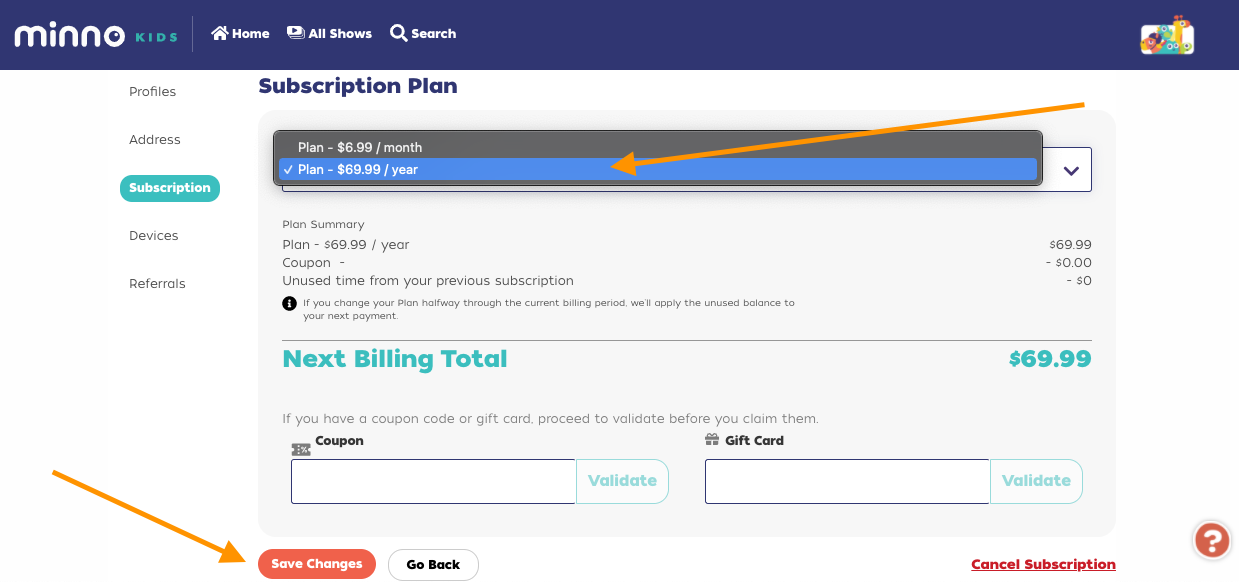
- Click “Subscription” from the left menu.
- Click the “Edit” button next to your subscription.
- Select the Annual Plan from the dropdown menu.
-
Click “Save Changes”.
If you signed up through Apple:
Follow the instructions on Apple’s Help Article Here.
If you signed up through Google:
You will first need to cancel your monthly plan, then resubscribe with an annual one. Follow the instructions on Google's Help Article here.
If you signed up through Roku:
Follow the instructions on Roku’s Help Article here.
If you signed up through Up Faith & Family:
Follow the instructions on Up Faith & Family’s Help article here.